

Separation & isolation lighting: three practical setups
Good separation makes the edges of your subject readable against the background. You can light the background, add light to the subject’s outline, or place a large illuminated surface behind the subject. Each approach solves a different problem.
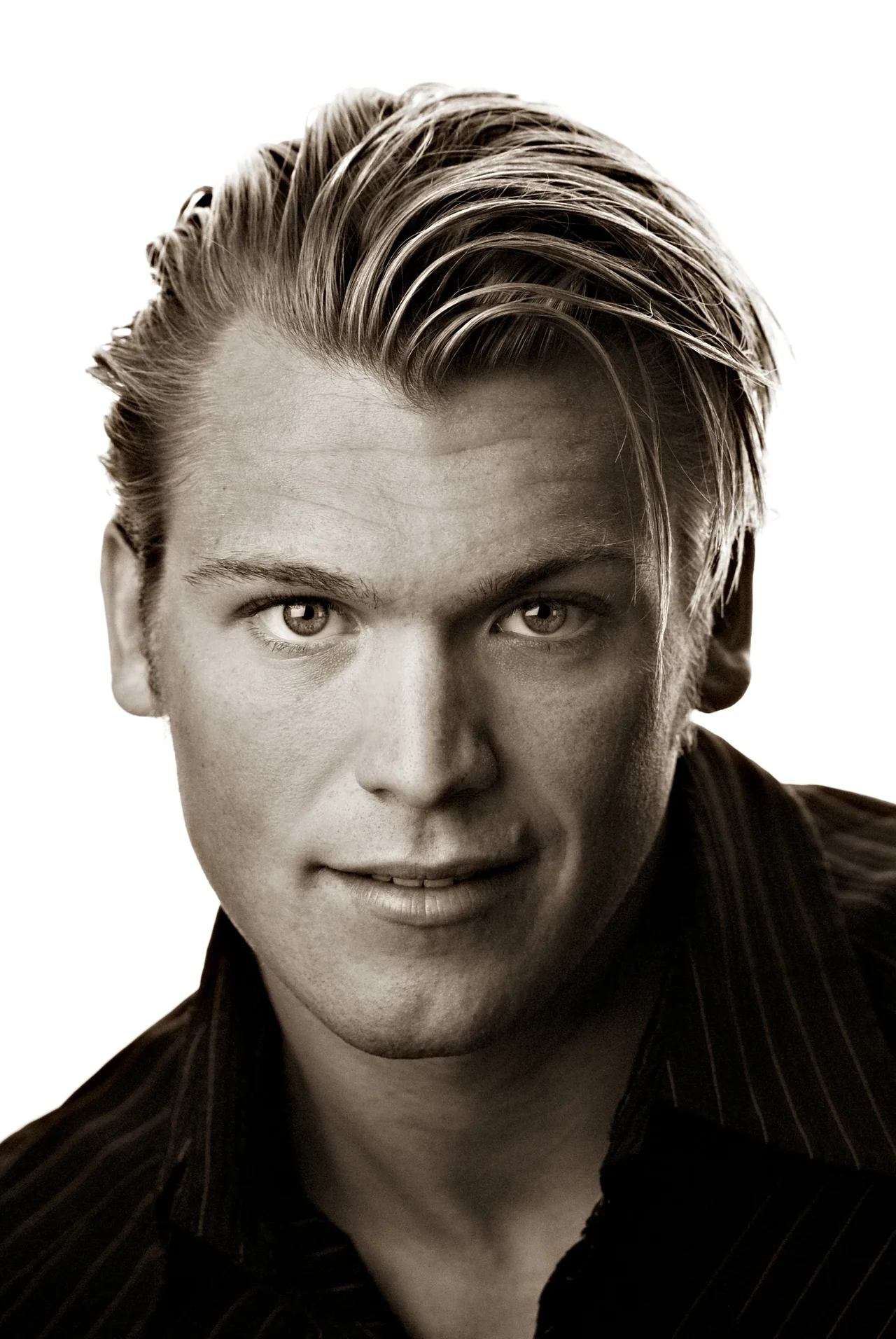
Separation and a white background are different goals. A rim light can reveal dark hair against a dark background without turning that background white. A white backdrop can isolate a product without a visible rim. Decide which result you need before adding another light.
Choose the setup for the result
| Goal | Starting point | Watch for |
|---|---|---|
| Control background brightness | Setup 1: light the backdrop independently. | Uneven brightness and light spilling onto the subject. |
| Reveal hair or an outline | Setup 2: position a rear light to catch the desired edge. | Clipped highlights and direct light entering the lens. |
| Create a large bright field | Setup 3: use an illuminated translucent background. | Flare, lost contrast, and edges that wash out. |
The diagrams below redraw the three setups from the original article. They show relationships, not measured distances or power settings. The key light is camera left; camera-right fill can be another light or a reflector.
1. Light the background separately
Set the key light for the subject first. Add fill only as needed, then introduce a light aimed at the background. This lets you adjust the backdrop without changing your chosen subject exposure.
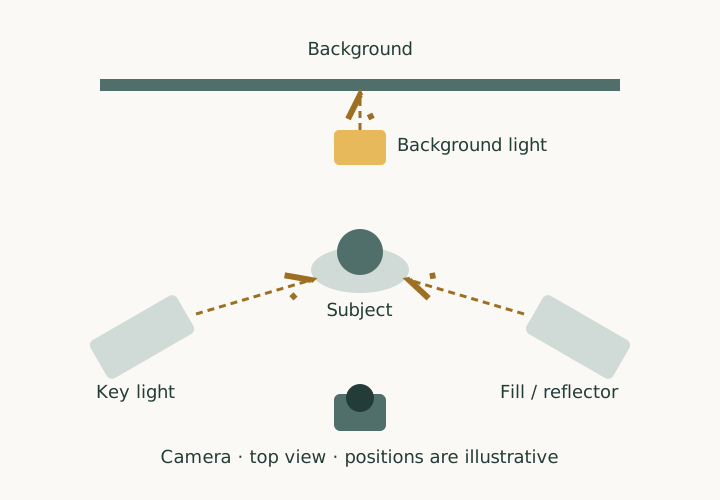
For a wider, evenly lit background, two background lights aimed from opposite sides can help. Check the whole area that will appear in the frame. Move the subject away from the backdrop where space allows, and use flags to control unwanted spill.
Raise background output gradually while checking the image and highlight warnings. There is no universal power ratio: distance, modifier, backdrop, lens, and the intended finish all affect the result. More background light is not always better.
2. Add a rear or overhead light
Place a light above and behind the subject, then aim it at the hair, shoulder, or edge you want to reveal. A boom can keep a stand out of the composition; secure and counterweight it according to the equipment manufacturer’s instructions.
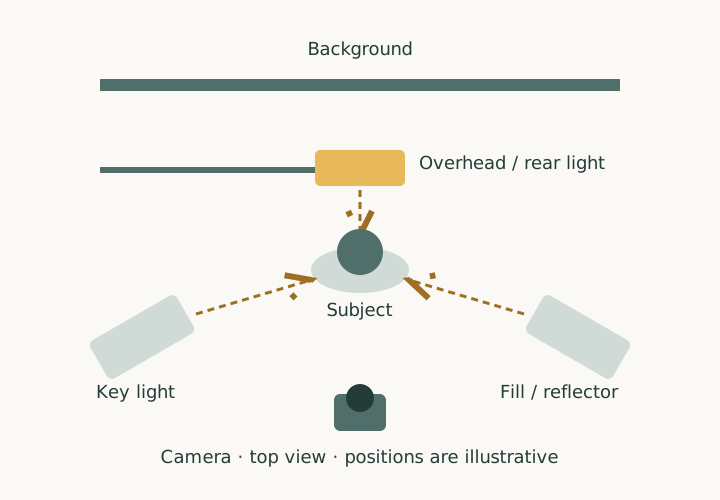
Start low and move the light until the highlight lands where it helps. Check for bright ears, shoulders, or stray reflections, and keep the light out of the lens’s direct view. This setup does not automatically produce an evenly white background.
For another practical example, broncolor demonstrates rim lighting with softboxes. The useful principle is controlled light on the subject’s contour, not a particular number of lights.
3. Use an illuminated background
A large softbox or a translucent background lit from behind can become the bright field behind your subject. Keep key and fill under separate control so the face or product remains readable.
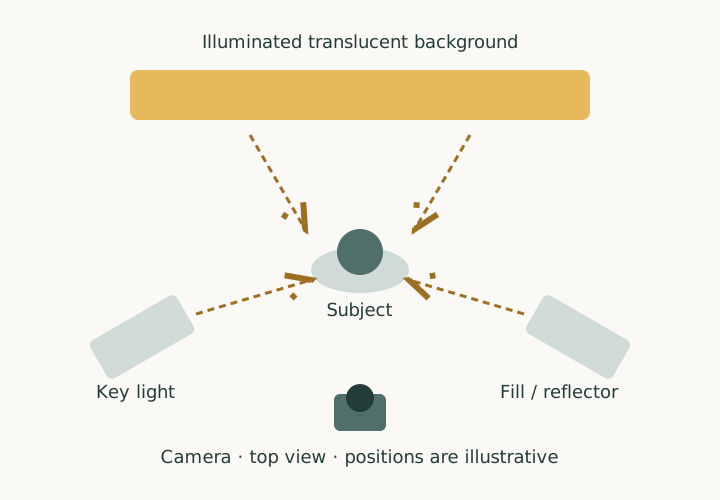
Make a test with only the background lit to see how much light wraps around the subject. Add the key, then inspect fine edges, dark clothing, and overall contrast. If they look washed out, lower the background output, adjust distance or framing, and flag light that reaches the lens.
Troubleshoot one change at a time
| What you see | What to check first |
|---|---|
| Background looks uneven | Light angle, distance, coverage, and how much of the backdrop is in the frame. |
| Hair or clothing edges disappear | Excessive background output or wrap. Reduce it before increasing the subject light. |
| The image looks hazy | Direct or reflected light reaching the lens. Change the angle or add a flag. |
| The rim is a bright stripe | Rear-light output, angle, and modifier size. Adjust its position before adding more fill. |
| The subject blends into the background | Try a change in background tone, subject position, or light direction. A rim light is one option. |
A repeatable setup sequence
- Choose the crop and background tone before placing lights.
- Set the subject’s key light and exposure.
- Add the minimum fill needed for the intended contrast.
- Introduce background or rear lighting and inspect its effect separately.
- Check the final frame at full size, especially hair, clothing edges, and reflections.
- Record positions and settings so you can reproduce the result.